



General
- What is the SD Association?
- What is the function of the SD Association?
- How can the SD Association help me?
- What are the benefits of SD standards?
Product
- What specifications have been developed by SD Association?
- In what types of products are SD standards used?
- How are the SD specifications developed?
- How can my company obtain the SD specification?
- Does SD Association have a product certification program? How do you get certified?
- What is the SD Speed Class?
- What are the applications for Speed Class?
- What is UHS-Ⅰ/UHS-Ⅱ/UHS-Ⅲ?
- What is the SD Express?
Licensing
- Why do the SD-3C, LLC and the SDA have different agreements?
- Has the License Agreement for SDA Memory Card Specifications (LAMS) agreement changed?
- What is the Card License Agreement (CLA)?
- What are the benefits of signing the current SDALA?
- Do pre-2013 HALA licensees need to take any steps now?
- Are all new SDA members required to complete the SD-3C HALA?
- What is the non-member Non-Disclosure Agreement (“NDA”)?
- Is a license needed for CPRM?
- Do all SD cards support CPRM features?
- What type of content protection technology is expected to be offered other than CPRM on SD memory card?
- How can I identify CPRM and non-CPRM card?
- How can I select CPRM card ?
- May an SDALA Licensee use a subcontractor to manufacture and/or design an SD Memory Card, SD Host Product or SD Ancillary Product?No new SDALA is required by the SDA for newly adopted or revised specifications. Please contact
- Must a company be a member of the SDA to gain access to the SD Specifications?
- Why is no indemnification given by the SDA to Licensee even though a Licensee is required to indemnify the SDA for
claims arising out of its use of the SD Association Specifications? - If a non-member company desires to produce a standalone product that hosts SD Memory Cards, what agreement should
it sign? - If a non-member company desires to produce an ancillary product that is interoperable with SD Host Products or SD Memory Cards, what agreement should it sign?
- If a non-member company desires to produce an I/O Card, what agreement should it sign?
- If a non-member company desires to produce SD Memory Cards, what agreement should it sign?
- Will Licensees need to sign a new SDALA, SD-3C HALA, CLA or other agreement each time a revision or new SD Specification
is released? - How are disclosed Essential Patent Claims that cover higher levels and future versions of SDA Specifications to be
licensed?
- What SD Specifications are mandatory or optional for SD Host Products?
- Is implementation of the Part 3 (Security) mandatory for all SD Host Products or SD Ancillary Products?
- When may an SDA member use the SD logo, SDA Application Designations, or SDA Pictographs?
- Is verification of product compliance mandatory?
- Are there any verification tools available from the SDA to assist in testing?
- Whom should potential Licensees contact with further questions about licensing from SD-3C, LLC or SDA?
- What is the structure of the Association?
- How can my company become a member?
- What is the duration of the membership?
- Do I need to be a member of the SD Association in order to be a distributor or third party entity distributing other
members SD product?
Membership
- What is the structure of the Association?
- How can my company become a member?
- What is the duration of the membership?
- Do I need to be a member of the SD Association in order to be a distributor or third party entity distributing other
members SD product?
Other
General
What is the SD Association?
- The SD Association is a global ecosystem of companies setting industry-leading memory card storage standards that simplify the use and extend the life of consumer electronics, including mobile phones, for millions of people every day. SD Association was formed in January 2000 by Panasonic Corporation, SanDisk Corporation, and Toshiba Corporation. Today, the Association is made up of about 800 member companies involved in the design, development or manufacturer of products using SD standards. The small, postage stamp-sized removable memory cards are used by hundreds of brands across dozens of product categories and found in thousands of device models. SD memory card and SD host device are the generic terms for any memory card or device built to SD standards. SD Association does not manufacture, market or sell any product; it creates standards and then promotes the adoption, advancement and use of SD standards used by competing product manufacturers that make interoperable memory cards and devices.
What is the function of the SD Association?
- The SD Association establishes the technical and specification standards for SD memory card applications, continuously promotes SD as the leading industry standard, and encourages the development of digital A/V, wireless communication, and digital networking products that utilize the many unique benefits of SD standards.
How can the SD Association help me?
- By becoming an SD Association member, you receive the latest information on SD standards allowing you to build products and solutions that conform to the standard and avoid potential compatibility issues. You also may participate in SD Association activities to help advance the future of SD technology.
What are the benefits of SD standards?
- SD is the leading standard for mobile phones, digital cameras, audio players, personal computers, printers, car navigation systems, electronic books, and many other consumer electronic devices. Many SD standards are available in a variety of capacities and speed classes: SDHC/SDXC and microSDHC/microSDXC. SD standards enable manufacturers to deliver high-performance products that simplify how millions of consumers capture and enjoy video, photos, and sounds every day. With SD standards-based products, consumers have the ultimate flexibility and convenience to store and share digital contents anytime and anywhere.
Product
What specifications have been developed by SD Association?
- SD Association standards and specifications include:
- Standard Memory Cards (up to 2GB): SD, microSD
- High-Capacity Memory Cards (above 2GB, 32GB and less): SDHC, microSDHC
- Extended Capacity Memory Cards (above 32GB up to 2TB): SDXC and microSDXC
- Ultra Capacity Memory Cards (above 2TB up to 128TB): SDUC and microSDUC
- SDIO cards
- SD Speed Class (Class 2, 4, 6, 10), UHS Speed Class 1 and 3 and Video Speed Class 6, 10, 30, 60, 90
- Bus Speed: Normal, High and Ultra High Speed (UHS-Ⅰ , UHS-Ⅱ and UHS-Ⅲ), SD Express
In what types of products are SD standards used?
- SD is the leading standard for mobile phones, digital cameras, audio layers, personal computers, printers, car navigation systems, electronic books, and many other consumer electronic devices as well as some business solutions.
How are the SD specifications developed?
- The SD Association Technical Committee is made up of working groups focused on the development of next generation specifications.All members are allowed to participate in technical working groups but only Executive members are allowed to vote on the specifications.
How can my company obtain the SD specification?
- Your company may have access to the complete specification by becoming a member of SDA. If your company is in the R&D stages and requires the complete specification, it is available without membership by providing a signed Non-Disclosure Agreement (NDA) and payment of designated fees to the association for one year. If you plan to manufacture products, please visit our Use and Licensing section for more details and appropriate forms.
Does SD Association have a product certification program? How do you get certified?
- The SD Association offers a self-certification program to its members. The Compliance Committee recommends using the approved Test Specification which is made available to members in the Members Site. Members may locate additional information on compliance and testing under Compliance News in the Members Site.
What is the SD Speed Class?
- The SD Association has established standards that rate the minimum data transfer on the needs of companies creating video recording products that require certain writing speeds when recording the data onto a memory card. The SD Speed Class, UHS Speed Class and Video Speed Class standardized this for both memory cards and devices in order to guarantee minimum writing speeds and deliver the best performance.
What are the applications for Speed Class?
- Applications are listed on Speed Class Page.
What is UHS-Ⅰ/UHS-Ⅱ/UHS-Ⅲ?
- Ultra High Speed (UHS) defines bus-Interface speeds up to 104 MB/s for the UHS-Ⅰ, up to 312 MB/s for UHS-Ⅱand 624MB/s for UHS-Ⅲ. Bus speeds power data transfer speeds between SD host devices and SD memory cards. UHS is exclusive to SDHC and SDXC memory cards.
What is the SD Express?
- SD Express memory cards, serve as removable Solid State Drives (SSD), up to 3940 MB/s with PCIe technology with NVMe protocol maintaining UHS-I interface delivering speeds essential for high-resolution content applications such as super-slow motion video, RAW continuous burst mode and 8K video capture and playback, 360 degree videos, and mobile computing devices, gaming systems, multi-channel IoT devices, numerous automotive storage needs, to name a few.
Licensing
Licensing Documents
Why do the SD-3C LLC and the SDA have different agreements?
- SD-3C LLC and the SDA own different intellectual property, are separate legal entities and may collect fees independently. The SDA Board of Directors has determined it is appropriate for each organization to be responsible for agreements protecting their respective intellectual property and for any fees for using their intellectual property.
- All new members (as of January 1, 2017) are required to complete the SDA Membership Agreement, and for those wishing to make SD products, the SD Association License Agreement (SDALA). New members wishing to make SD products should comply with the SD-3C LLC’s agreements, including the SD-3C LLC Host and Ancillary Product License Agreement(SD-3C HALA) and Card License Agreement (CLA). The SD-3C LLC can be contacted for more information on these agreements at: admin@sd-3c.com
- There may be other license agreements required for SD products from other third parties, (e.g., the 4C Entity, LLC for CPRM licenses).
Has the License Agreement for SDA Memory Card Specifications (LAMS) agreement changed?
- The LAMS agreement has been replaced by the SDALA and is no longer offered.
What is the Card License Agreement (CLA)?
- The CLA is a confidential agreement related to SD Memory Cards between the SD-3C LLC and the licensee. As the SDA is not a party to this agreement, it cannot provide any guidance. The SD-3C LLC should be contacted for more information on this agreement at: admin@sd-3c.com.
What are the benefits of signing the current SDALA?
- The SD Association License Agreement (SDALA) includes a royalty-free license for SDA members for products using SD Association intellectual property (e.g., the SD Association Specifications and pictographs).
Do pre-2013 HALA licensees need to take any steps now?
- The pre-2013 joint HALA was a three party agreement between the licensee, the SD Association, and the SD-3C LLC, covering both SD Association and SD-3C LLC intellectual property. To replace the license coverage following the expiration of the joint HALA, your company should execute the SDALA and the SD-3C HALA. You can contact the SD-3C LLC for more information at: admin@sd-3c.com.
Are all new SDA members required to complete the SD-3C HALA?
- The SD-3C HALA is a confidential agreement between the SD-3C LLC and the licensee. As the SDA is not a party to this agreement, it cannot provide any guidance. The SD-3C LLC should be contacted for more information on this agreement at: admin@sd-3c.com.
What is the non-member Non-Disclosure Agreement (“NDA”)?
- The non-member NDA grants potential licensees a one-year evaluation license to both the SD-3C-owned and the SDA-owned portions of the SD Specifications. The SDA and the SD-3C have combined their efforts to create the current version of the NDA (sometimes referred to as the Combined NDA) so that potential licensees need to execute only one document to obtain an evaluation license to all portions of the SD Specifications. This NDA does not provide any right for commercial use of the SD Specifications.
- The NDA has a $1,000 administration fee. If your company becomes a member of the SD Association within ninety (90) days of the effective date of the NDA, then the SD Association will credit the $1,000 fee towards your membership.
Is a license needed for CPRM?
- The SD Specifications require implementation of CPRM for some types of SD Memory Cards.
If an SD Host or SD Ancillary Product will implement CPRM to record copyrighted content on SD Memory Cards, contact the 4C Entity, LLC (www.4centity.com) to determine your license requirements. As the SD Association is not a party to this agreement, it cannot provide any guidance.
Do all SD cards support CPRM features?
- No. Starting in 2018, SD memory cards can be produced without CPRM capabilities based upon the SD 6.10 specification version. This change reflects current market requirements with fewer content management restrictions. Japan still has more requirements where CPRM is used.
What type of content protection technology is expected to be offered other than CPRM on SD memory card?
- There is no plan to offer any new or different content protection features on SD memory cards. Application providers may implement proprietary content protection solutions using the card as a platform to store secured content.
How can I identify CPRM and non-CPRM card?
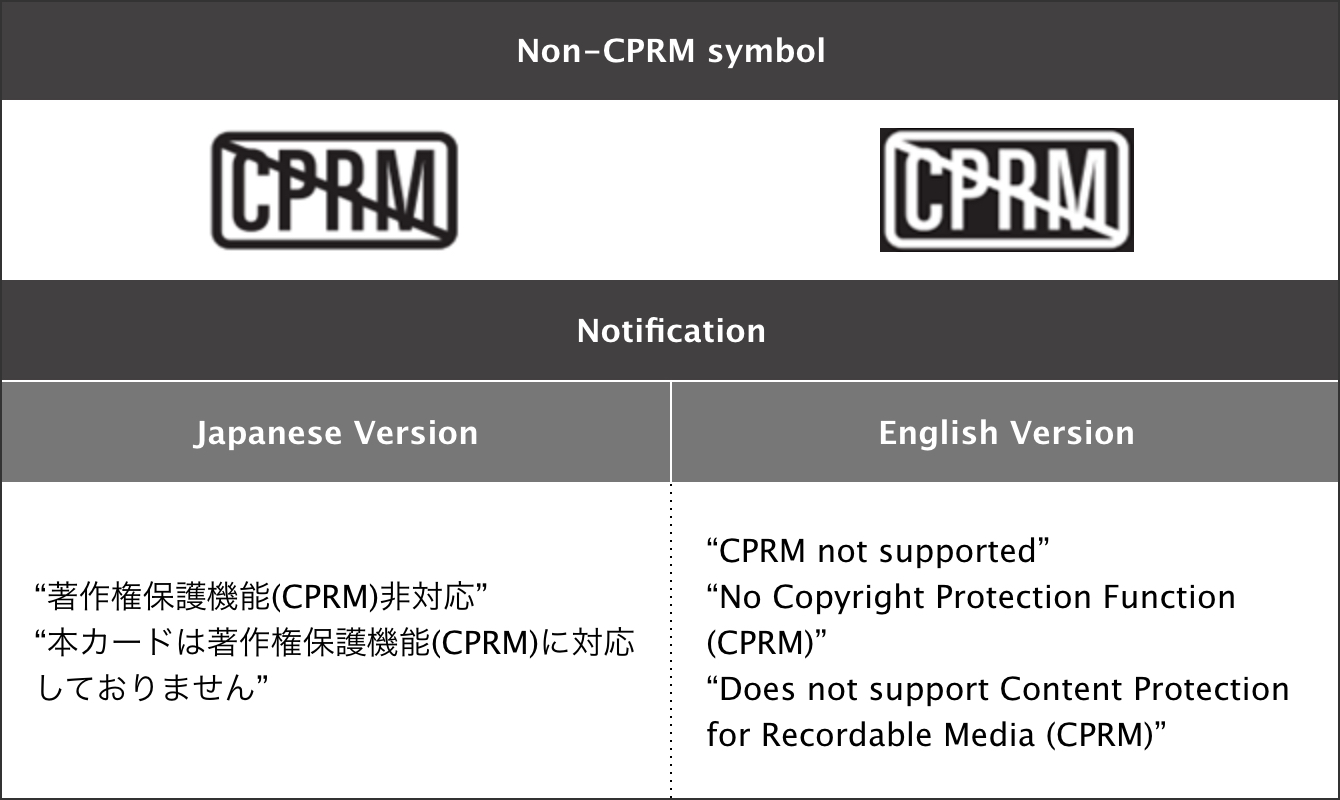
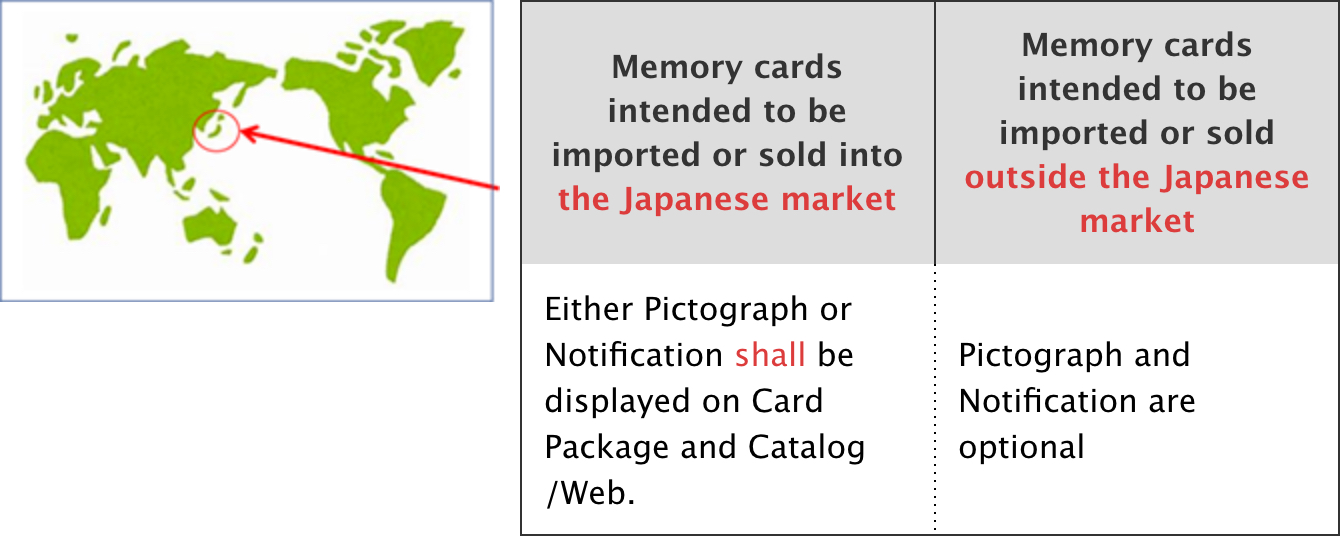
- The following symbol has been newly defined for the purpose of distinguishing SD cards without CPRM from those with CPRM. The use of this symbol on SD card package and Web/catalog is mandated in the Japanese market only.
- As for the markets outside of Japan, the use of this symbol is optional.

How can I select CPRM card?
- Since the SD card of 2 GB or less supports CPRM, you can use it with confidence. For SD cards larger than 2 GB, please contact the card vendor.
May an SDALA Licensee use a subcontractor to manufacture and/or design an SD Memory Card, SD Host Product or SD Ancillary Product?
- The SDALA includes provisions for this. See the SDALA for more details. Other third-party agreements may be required.
Must a company be a member of the SDA to gain access to the SD Specifications?
- Except for the NDA and certain historical agreements, only SDA members gain access to the SDA Specification Matrix.
Indemnification
Why is no indemnification given by the SDA to Licensee even though a Licensee is required to indemnify the SDA for claims arising out of its use of the SD Association Specifications?
- The SDALA license includes no royalty obligations to the SDA. Given the economics involved, the SDA is unable to offer any type of indemnification to Licensees. The SD Association is not responsible for implementations of SD Specifications and takes no responsibility for identifying all third-party intellectual property necessary for such implementation.
Host Products, Ancillary Products, SD I/O Cards and Memory Cards
If a non-member company desires to produce a standalone product that hosts SD Memory Cards, what agreement should it sign?
- Non-members should take the following steps:
- Become a member of the SD Association
- Execute the SDA License Agreement
- Ensure you are covered by a valid Host/Ancillary Product License Agreement (HALA) with the SD-3C LLC by contacting admin@sd-3c.com
- Implementation of CPRM for Host Products is optional under the SD Specification. If implementing CPRM in host products to record content on SD Memory Cards, contact the 4C Entity, LLC (www.4centity.com) to determine your license rights
- Other third-party agreements may be required. See the Specification Matrix for additional intellectual property disclosed to the SD Association
If a non-member company desires to produce an ancillary product that is interoperable with SD Host Products or SD Memory
Cards, what agreement should it sign?
- Non-members should take the following steps:
- Become a member of the SD Association
- Execute the SDA License Agreement
- Ensure you are covered a valid Host/Ancillary Product License Agreement (HALA) with the SD-3C LLC by contacting admin@sd-3c.com
- SD Specifications for certain SD Memory Cards require implementation of CPRM. More information on license rights can be found by contacting the 4C Entity, LLC (www.4centity.com)
- Other third-party agreements may be required. See the Specification Matrix for additional intellectual property disclosed to the SD Association
If a non-member company desires to produce SD Memory Cards, what agreement should it sign?
- Non-members should take the following steps:
- Become a member of the SD Association
- Execute the SDA License Agreement
- Ensure you are covered a valid Host/Ancillary Product License Agreement (HALA) with the SD-3C LLC by contacting admin@sd-3c.com
- Implementation of CPRM for ancillary products is optional under the SD Specification. If implementing CPRM in ancillary products to record content on SD Memory Cards, contact the 4C Entity, LLC (www.4centity.com) to determine your license rights
- Other third-party agreements may be required. See the Specification Matrix for additional intellectual property disclosed to the SD Association
If a non-member company desires to produce an I/O Card, what agreement should it sign?
- It depends. An I/O Card without Memory Storage is considered to be an SD Ancillary Product.
An I/O Card with Memory Storage is considered to be an SD Memory Card.
Future Specifications
Will Licensees need to sign a new SDALA, SD-3C HALA, CLA or other agreement each time a revision or new SD Specification is released?
- No new SDALA is required by the SDA for newly adopted or revised specifications. Please contact the SD-3C LLC at admin@sd-3c.com for assistance with questions for the SD-3C HALA and CLA. Other third-party agreements may be required. See the Specification Matrix for additional intellectual property disclosed to the SD Association.
How are disclosed Essential Patent Claims that cover higher levels and future versions of SDA Specifications to be licensed?
- As described in the SDA IP Policy, Essential Patent Claims disclosed to the SD Association are documented in the Specification Matrix. Contact the intellectual property holder to determine license availability and terms. The SDA is not involved in the licensing of any third-party IP (Essential or Non-Essential).
Technical Implementation
What SD Specifications are mandatory or optional for SD Host Products?
- Hosts products shall fully comply with Part 1 (Physical Layer) and Part 2 (File System) of the SD Specification in order to achieve minimum interoperability with SD Memory cards. Complying with Part 3 (Security) and higher of the SD Specifications is optional. All SDA members that manufacture SD Host Products are encouraged to implement all applicable portions of the optional parts of the SD Specifications (Parts 3 and higher) in order to facilitate interoperability.
Logo Usage
What kind of agreement a SDA member needs to use SD Logo and SDA Pictographs?
- SDA membership does not include the right to use the SD Logos, or SDA Pictographs. SD Logos usage rights are granted pursuant to the SD-3C HALA and CLA. SDA Pictographs usage rights are granted pursuant to the SDALA.
- The use requirements for SD logos and the SDA pictographs are specified by the “SD/SDA Logo Guideline” document.
Verification
Is verification of product compliance mandatory?
- All Licensees are obligated to conduct self-verification in accordance with the procedures outlined in Schedule C of the SDALA. Contact SD-3C LLC at admin@sd-3c.com for assistance with questions for the SD-3C license agreements.
Are there any verification tools available from the SDA to assist in testing?
- The SDA does not provide verification tools. The SDA does develop Test Guidelines and Test Tools to help member’s self-verification. Test Tools specified for UHS-II and SD Express are available from SDA Designated Labs. There are also other test tools available in the market that implement these test guidelines, however any such products are independent of the SDA.
Further Questions
Whom should potential Licensees contact with further questions about licensing from SD-3C LLC or SDA?
- All inquiries regarding interpretation of the SD-3C HALA or CLA as it relates to the SD Group Specifications and billing inquiries for SD-3C HALA or CLA license fees should be directed to admin@sd-3c.com.
- Inquiries regarding interpretation of the SDALA, the NDA and SDA Membership information should be directed to help@sdcard.org.
Membership
What is the structure of the Association?
- The SD Association has two levels of membership – Executive and General. Executive members may attend all meetings and are entitled to vote on all SD Association related matters, receive all publications of the corporation and may be elected to serve on the Board of Directors. The annual fee to join at the Executive membership level is $4500 per year. General members may attend all meetings and receive all publications of the organization. The annual fee to join at the General membership level is $2500 per year.
How can my company become a member?
- Fill out the online form, email the signed application and membership agreement to the SD Association office, and pay the first year of membership. Applicants are also required to read and agree to all of the principles, policies and procedures as set forth in the SD Association’s By-laws, Antitrust Guidelines and Intellectual Property Policy.
What is the duration of the membership?
- Membership in the SD Association is yearly. Annual member dues are automatically billed to the member company unless the member officially resigns from membership in writing to the SD Association office at least 30 days prior to renewal date.
Do I need to be a member of the SD Association in order to be a distributor or third party entity distributing other members SD product?
- No; however the OEM needs to be a member in good standing.
Other
How can I get more information on the Association?
- Please contact the SD Association office at help@sdcard.org.
Non-CPRM symbol, notification and their location rule (from Logo Guideline V6.1)