



If you are a consumer experiencing technical issues with your SD product please contact the manufacturer directly for support. As the SD Association is a standards organization and does not make or sell any SD products we are unable to provide product support.
- What is the SD Speed Class?
- What are the applications for Speed Class?
- What is UHS?
- What is the SD Express?
- What is the CPRM?
- Is CPRM applied to all data types stored on the SD memory card?
- Do all SD cards support CPRM features?
- What type of content protection technology is expected to be offered other than CPRM on SD memory card?
- How can I identify CPRM and non-CPRM card?
- How can I select CPRM card?
- Can you save data in different formats such as audio, video, still pictures and documents on a single SD memory card?
- What do you need to transfer data from a memory card to a computer?
- In terms of capacity, what SD standards will be available in the future?
- What is the service life of an SD memory card?
- What is the difference between the SD memory card and the miniSD memory cards/microSD memory cards?
- Will the miniSD memory card and microSD memory cards replace the current SD memory card?
- My SD memory card does not seem work in my device, what should I do?
- Is there a way to retrieve deleted pictures?
- Where can I get the best SD memory card for my device, and what brand do you recommend?
- What is the right size SD memory card for me?
- Are SD memory cards waterproof?
- What is the warranty of my SD memory card?
SDXC Standard – (more than 32GB up to 2TB)
- What is SDXC?
- Are SDXC memory cards compatible with existing SD devices?
- How does the SDXC standard change or improve devices?
- How will SDXC memory cards change or improve the user experience?
What is the SD Speed Class?
- There are four kinds of Speed Classes, “Speed Class”, “UHS Speed Class” , “Video Speed Class.” and “SD Express Video Speed Class.”
As a characteristic of flash memory, actual transfer speed varies. Variable speeds are difficult to reliably record streaming content such as video because it requires a constant writing speed.
All speed class types assures minimum sequential card access performance including multiple stream access (in SD Express Speed Classes) under defined conditions specified in the standard. It is most important for video recording and other applications. It is also applicable for any write or read applications that requires an assured minimum constant sequential access performance
What are the common applications for Speed Class?
- Class 2 : H.264 Video Recording, MPEG-4, MPEG-2 Video Recording
Class 4: MEPG-2 (HDTV) Video Recording
Class 6 / V6 : SD to HD Video Recording
Class 10/U1/V10 :HD to Full HD Video Recording
U3/V30 : Full HD to 4K Video Recording
V60: 4K UHD to 8K Video Recording
V90: 8K UHD Video Recording
E150: 4K UHD Multiple Stream Video or Intra* Video recording
E300: 4K/8K UHD Multiple Stream Video or Intra* Video recording
E450: 8K UHD Multiple Stream Video or Intra* Video recording
E600: 8K UHD Multiple Stream Video or Intra* Video recording
What is UHS?
- UHS (Ultra High Speed) defines bus-interface speeds up to 624 Megabytes per second with UHS-I (104MB/s) , UHS-II (324MB/s) and UHS-III (624MB/s) classification for greater device performance.
It is available on both SDHC and SDXC memory cards and devices.
What is the SD Express?
- SD Express memory cards, serve as removable Solid State Drives (SSD), up to 3940 MB/s with PCIe technology with NVMe protocol maintaining UHS-I interface delivering speeds essential for high-resolution content applications such as super-slow motion video, RAW continuous burst mode and 8K video capture and playback, 360 degree videos, and mobile computing devices, gaming systems, multi-channel IoT devices, numerous automotive storage needs, to name a few.
What is the CPRM?
- CPRM – Content Protection for Recordable Media – provides the method of copyright protection for SD-Audio, SD Binding and SD-SD etc.
This content protection standard was developed by 4C Entity LLC and adopted to SD security standard.
Is CPRM applied to all data types stored on the SD memory card?
- No, copy-protection is not mandatory for all data types and can be asserted selectively at the discretion of the content owner. CPRM technology, a copy protection mechanism, is embedded in all SD standards-based memory cards and can be used to protect copyrighted content such as most commercially distributed music and movie files. To use CPRM in SD memory cards, CPRM-compliant products such as SD-Audio players, SD-Video mobile phones or enabled devices such as a computer with CPRM-enabled SD slot or CPRM-enabled USB read/write are also required.
Do all SD cards support CPRM features?
- No. Starting in 2018, SD memory cards can be produced without CPRM capabilities based upon the SD 6.10 specification version. This change reflects current market requirements with fewer content management restrictions. Japan still has more requirements where CPRM is used.
What type of content protection technology is expected to be offered other than CPRM on SD memory card?
- There is no plan to offer any new or different content protection features on SD memory cards. Application providers may implement proprietary content protection solutions using the card as a platform to store secured content.
How can I identify CPRM and non-CPRM card?
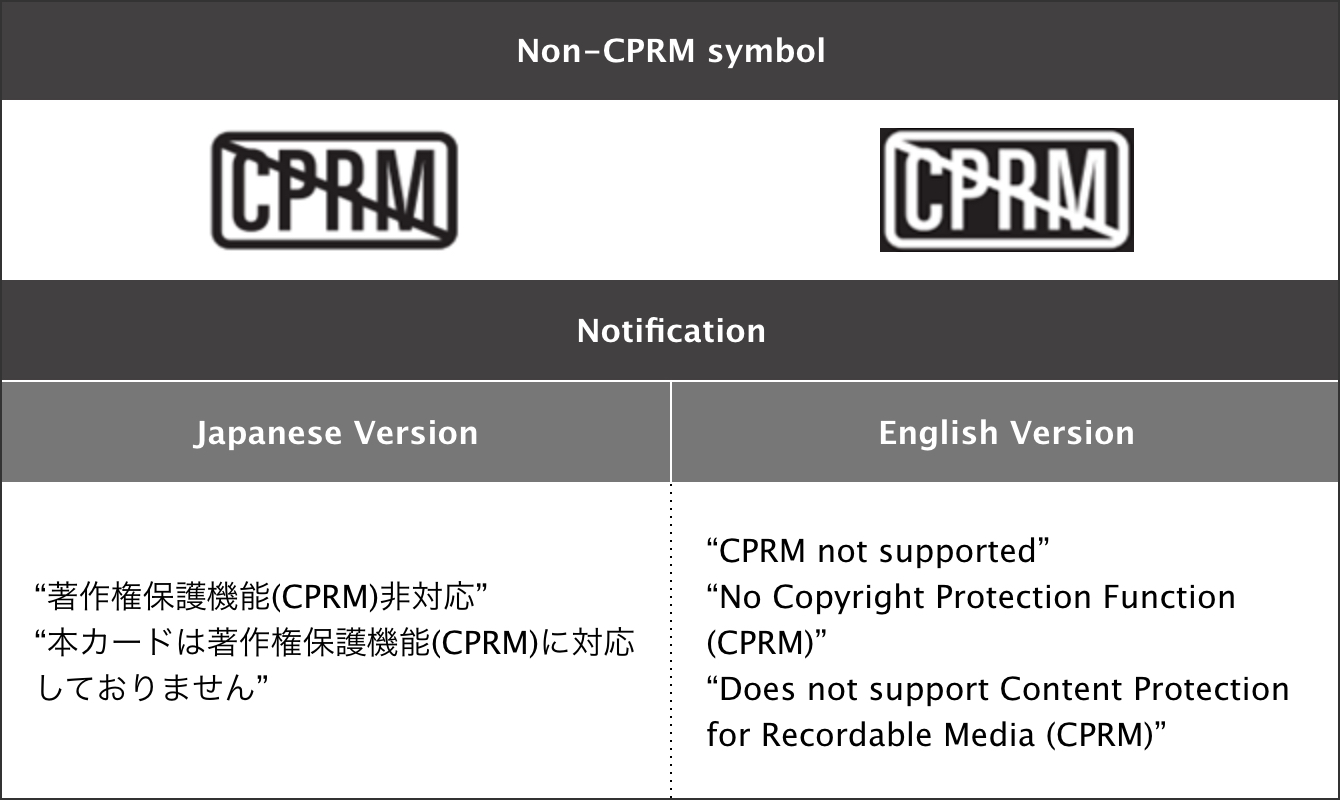
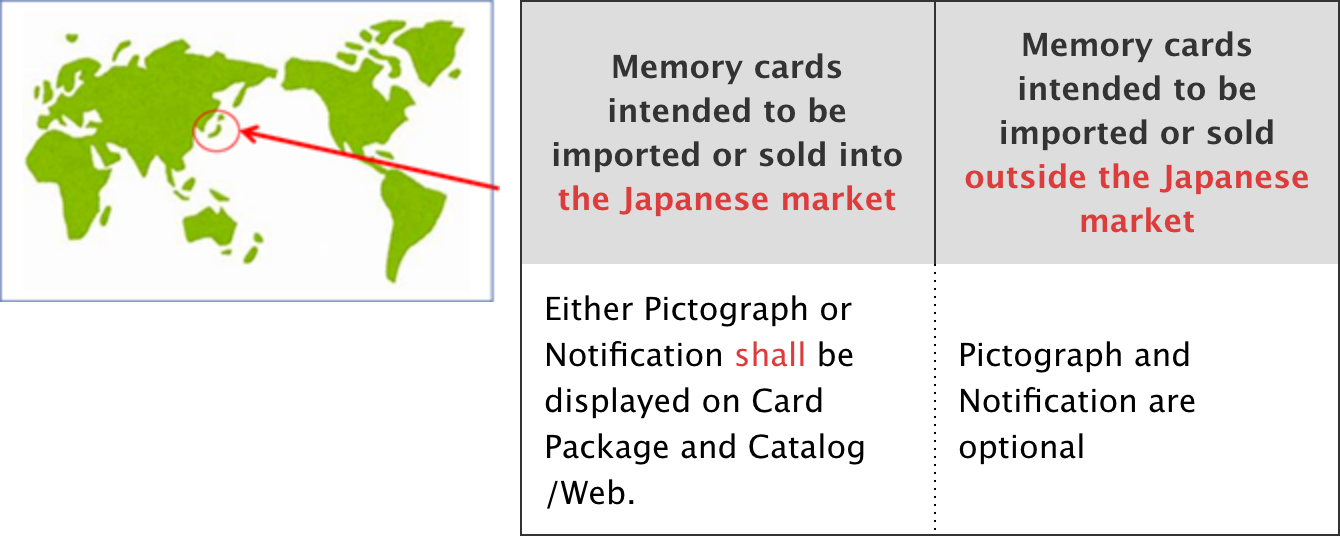
- The following symbol has been newly defined for the purpose of distinguishing SD cards without CPRM from those with CPRM. The use of this symbol on SD card package and Web/catalog is mandated in the Japanese market only.As for the markets outside of Japan,the use of this symbol is optional.

How can I select CPRM card?
- Since the SD card of 2 GB or less supports CPRM, you can use it with confidence. For SD cards larger than 2 GB, please contact the card vendor.
Can you save data in different formats such as audio, video, still pictures and documents on a single SD memory card?
- Yes, you can save data in any format as long as the card has sufficient memory capacity. However, to play or transfer the data you will need a device that is compatible with the appropriate data format such as SD-Audio, SD-Video and SD Document.
What do you need to transfer data from a memory card to a computer?
- Most computers are built with multiple ports for different data connection standards, including SD standards. If your computer is equipped with an SD slot, you can transfer data by simply inserting the SD memory card. If your computer does not have an SD slot, or is built to an earlier SD standard than your memory card, you can use a USB reader/writer or computer card adapter to transfer data from your memory card to your computer. Computer editing software for each type of data such as sound, music and still images also is needed.
In terms of capacity, what SD standards will be available in the future?
- Currently, three different SD memory card standards define a range of capacities from 8MB up to 2 Terabytes. Each memory card manufacturer, and not the SD Association, determines when it will introduce larger capacity cards into the marketplace.
What is the service life of an SD memory card?
- This depends on how your product in manufactured. SD standards-based memory cards, like most semiconductor cards, store information in flash memory. The current technology along with normal usage typically gives the card a lifespan of 10 years or more, allowing consumers to upgrade their devices for many years and reduce consumer electronic waste.
What is the difference between the SD memory card and the miniSD memory cards/microSD memory cards?
- Only the form factor, size, and number of pins and “with or without” of the write protect switch of the miniSD memory cards/microSD memory cards are different from the standard SD memory card. The logic and electronics of both the miniSD memory card/microSD memory card and the SD memory card are identical.
Will the miniSD memory card/microSD memory card replace the current SD memory card?
- No. The miniSD standards/microSD standards were designed to meet mobile phone manufacturers’ requirements for the smallest possible memory card size.
My SD memory card does not seem work in my device, what should I do?
- The SD Association is an organization developing SD standards. The SD Association does not manufacture any SD memory cards, but its members do so you should contact the memory card manufacturer. However, there are basic steps you may take:
- Make sure you insert your SD memory card per instruction from your device’s user manual
- Note any error messages shown on your devices, and then check the user manual
- Contact the SD memory card manufacturer for any assistance
- Contact your retailer where you obtained the SD memory card, if an RMA process is required
Is there a way to retrieve deleted pictures?
- Please refer to your memory card manufacturer’s instructions on how to retrieve deleted pictures. The SD Association does not supply the tools for photo retrieval.
Where can I get the best SD memory card for my device, and what brand do you recommend?
- SD standards-based memory cards are widely available at leading consumer outlets worldwide. You should follow your device’s user manual for best capacity and speed class suitable for the device. The SD Association creates standards for SD memory cards but does not recommend SD memory card manufacturers.
What is the right size SD memory card for me?
- Please follow device’s user’s manual for best size (capacity) and speed class card suitable for the device.
Are SD memory cards waterproof?
- The specific characteristics of an SD standards-based memory card are dependent on the SD memory card manufacturers. Some card makers use unique manufacturing technology to make the cards waterproof as an added feature while others do not. Please check with the specific SD memory card manufacturer for card features.
What is the warranty of my SD memory card?
- Please check with the specific SD memory card manufacturer for product warranty.
SDXC Standard
What is the SDXC standard?
- The SDXC standard is the newest SD standard. It supports memory capacities above 32GB up to 2TB. Devices (cameras,video cameras, computers, etc.) that are compliant to the SD Physical Layer and File System 3.00 version specs can support SDXC memory cards as well as SDHC memory cards and SD memory cards.
Is the SDXC standard compatible with existing SD devices?
- Existing SD devices and SDHC devices are not be compatible with new SDXC memory cards, but existing SD memory cards and SDHC memory cards will still continue to be offered by card manufacturers for the foreseeable future. Existing SD memory cards and SDHC memory cards will work in SDXC devices.
How does the SDXC standard change or improve devices?
- The SDXC standard changes and improves how much the device can do. The faster bus speeds will enable improvements like professional-level recording in compact consumer camcorders and exponentially increase the number of frames shot in a second with SDXC cameras. With an SDXC slot, downloaded content can turn car navigation systems into a media center.More music and photos can be stored on a card, allowing for greater freedom and longer playing times. Consumers have the ability to upgrade their devices for years and reduce their electronic waste.
How will the SDXC standard change or improve the user experience?
- The SDXC standard is enabling the development of higher performance devices like 3D video cameras that store more multimedia content for better user experience. Faster transfer speeds and up to 2TB storage will enable fast high-def video recording and downloading in any SDXC device. It also provides the capability for improved consecutive photo shooting – 60 frames per second – in SDXC standard-equipped professional cameras. Mobile handset users will be able to download more music, high-def videos and graphic-heavy games more quickly via side-loading with SDXC memory cards.
Non-CPRM symbol , notification and their location rule(from Logo Guideline V6.1)